Ask any veteran lawn care, pressure washing, or pest control operator what separates a profitable route from a losing one, and you'll hear the same two words: route density.
Ten jobs scattered across three towns is a day of windshield time. Ten jobs on two adjacent streets is a day of billable work. Same crew, same equipment, same hours — wildly different margins. The drive time between jobs is the most expensive part of your day, and nobody pays you for it.
Here's the problem: every tool on the market helps you optimize the route you already have. Route planners reorder your stops. Dispatch boards color-code the chaos. But none of them help you create density — none of them get the house next door to book.
That's what Fill My Route does. It's built into Simple Time, and it turns every job you schedule into a small neighborhood marketing campaign that runs itself.
How it works
Step 1: Book a job like you always do
Schedule a work order in Simple Time — say, a power washing job for Tuesday the 16th. That job becomes the anchor for a neighborhood route. From the work order page, click Generate route link.

Step 2: Your customer does the marketing for you
Simple Time emails your customer a personal share link with a simple pitch: "You're booked for Tuesday. Share this link with your neighbors — if 2 of them join your route, you get 15% off your invoice."
Your customer posts it on Facebook, Nextdoor, or the neighborhood group chat. They're not doing you a favor — they're saving money. That's the difference between asking for referrals and making referrals worth someone's time.
Step 3: Neighbors claim a spot in seconds
When a neighbor clicks the link, they see a clean booking page: your business name, the service date, the service on offer, a map of the route area, and a live meter showing how many spots are left. No app to download. No account to create. Just their address and how to reach them — the service is already set, because it's the same one your crew is bringing to the neighborhood.
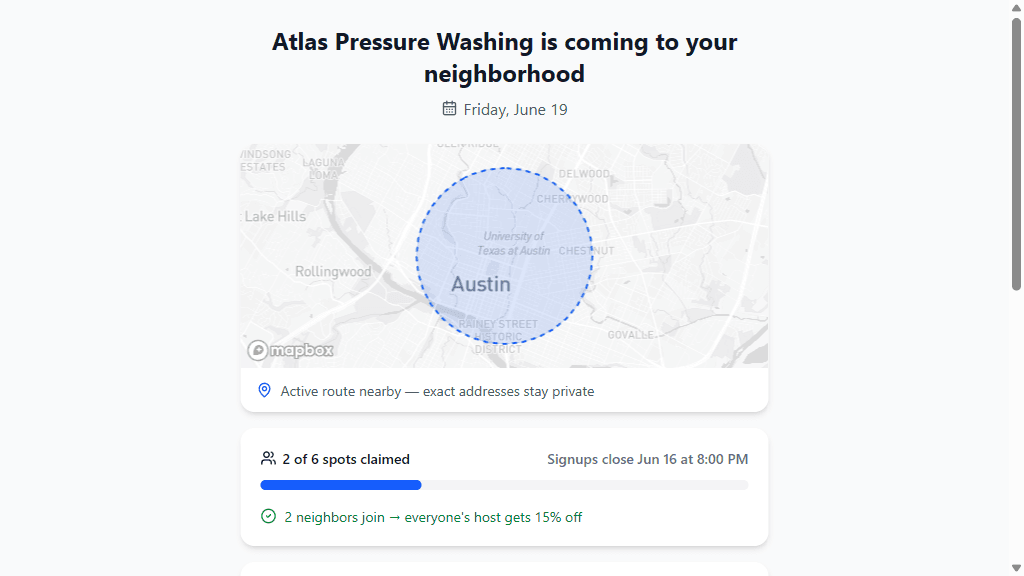
Two things happen behind the scenes:
- Privacy is protected. The map shows the general route area — never your customer's exact address. Neighbors see "active route nearby," not "the Hendersons at 412 Maple."
- The radius is enforced. Addresses outside the route area (about 1.5 miles by default — you can change it) get a friendly "you're a bit outside this route" message, and their details are still saved as a lead for a future route.
Step 4: You approve, the discount applies itself
Every signup lands in your Fill My Route inbox as a pending route match. One click on Approve and Simple Time creates the client, the site, and a new work order on the same day as the anchor job. Decline anything that doesn't fit.

When enough neighbors are approved to hit a discount tier, your original customer's discount is applied to their invoice automatically. No sticky notes, no "remind me to knock 15% off." The promise you made in the share email is kept by the software.
The math that makes this work
Say your average job is $300 and your customer acquisition cost through ads is $80–150 per booked job (if you're lucky).
A Fill My Route campaign that adds two neighbors to one anchor job:
- Two new jobs at ~$300 each, acquired for the cost of one 15% discount (~$45)
- Near-zero drive time between stops — the crew walks next door
- Two new customers in your system for next season's recurring work
You traded $45 for $600 of same-day revenue and two future relationships. And the customer who shared the link? They're now the person on their street who "knows a guy" — which means they're not going anywhere either.
The guardrails
Fill My Route is designed so you stay in control:
- You approve every job. Nothing lands on your schedule without your sign-off.
- Links close before the service date (48 hours by default) so you have time to plan the crew and equipment.
- Spots are capped. Set the maximum number of neighbor jobs per route so you never overcommit a day.
- Discount tiers are yours. 2 neighbors for 15% off is the default — set whatever protects your margin.
Set your defaults once under Settings → FillMyRoute — radius, spot cap, link expiry, and discount tiers. Every link you generate uses them, and each link keeps the settings it was created with.
Why we built it into Simple Time
Field service software has always been an operational cost: it tracks the work you already won. We think your software should also be a revenue engine.
You already have the two hardest assets to acquire: a booked job and a happy customer at the center of a neighborhood full of lookalike customers. Fill My Route just connects them.
Fill My Route is included with the Simple Time Professional plan. If you're on a trial, it's already turned on — open any scheduled work order and look for the route link card.
Start your 14-day free trial at app.simpletime.io — no credit card required.